Log into Federation Manager
Last updated: 17 April 2026
Using API
-
At the moment the API is not generally available, if you would like access please email support@aaf.edu.au
-
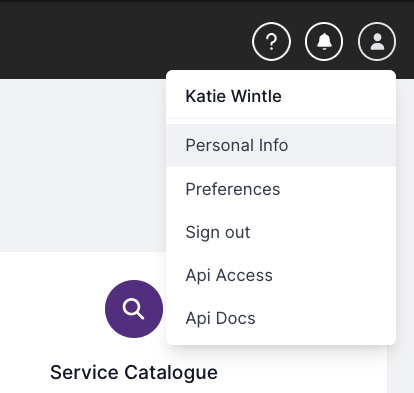
Once you have access, log into the Federation Manager Dashboard, click on ‘Api Access’ in the user menu.
-
Generate a new API key, The name isn’t that important, make sure you store the token somewhere safe as it is hidden after you leave the page.
-
Once you have your API key you can test the api.
Via the api docs:
- log into the Federation Manager Dashboard, click on ‘API Docs’ in the user menu.
- Enter the token in the authentication section of the API docs and press set.
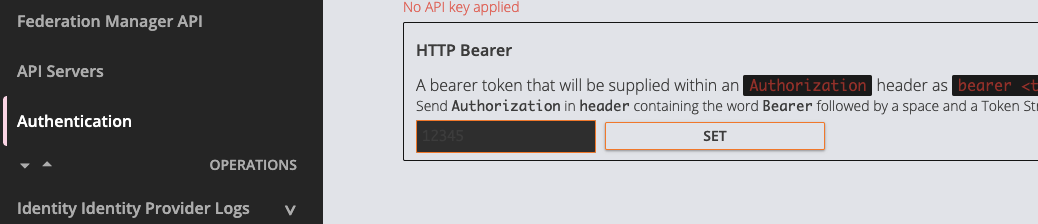
- Test it is all working by requesting identity Providers and verify you can see the identity providers you can see in the dashboard.
Via Curl:
If you would like to test it via a more programmatic way i.e curl:
- Simply provide the API Key as a auth header in the format see the following example requesting all identity providers:
curl -X GET "https://manager.test.aaf.edu.au/identity_providers" \
 -H 'accept: application/json'\
 -H 'authorization: Bearer API_KEY_REPLACE_ME'\
 -H 'x-api-version: 1'
- Verify the curl response lists the same identity providers that you can see in the dashboard.